Work  /  Oceans, Reefs & Aquariums

ORA Mobile Ordering Portal

Conceptual product design

The ORA Mobile Ordering Portal is a conceptual design that will enable new and existing hobbyists and dealers to access ORA’s extensive aquaculture livestock catalog.

Client
Oceans, Reefs & Aquariums
Disciplines
UX/UI · Product Design · Brand
Deliverable
Concept & prototype
Research
5 user interviews

Initially the project started as a mobile ordering portal for existing ORA dealers, to let them place orders from anywhere. After conducting surveys and user interviews it was clear this couldn’t only be offered to dealers — hobbyists needed a way to browse livestock, build wish lists, share those lists and build orders with their local fish stores.

I pivoted from building a mobile ordering portal for a single user type into a multi-user tool exclusively branded for ORA. My survey results concluded that both hobbyists and dealers wanted an intuitive, visually immersive portal where they could explore and order ORA aquaculture livestock. Through this discovery, the concept grew.

The problem
Existing ORA hobbyists and dealers want an intuitive, visually immersive portal where they can explore and order from ORA’s extensive aquaculture livestock catalog — but they are faced with an existing portal shared with a direct competitor, often leading to brand confusion and accidental order placement.
The goal
How might we create a visually immersive ordering experience for both hobbyists and ORA dealers that is tailored to each user type and keeps to ORA’s existing branding?

The solution

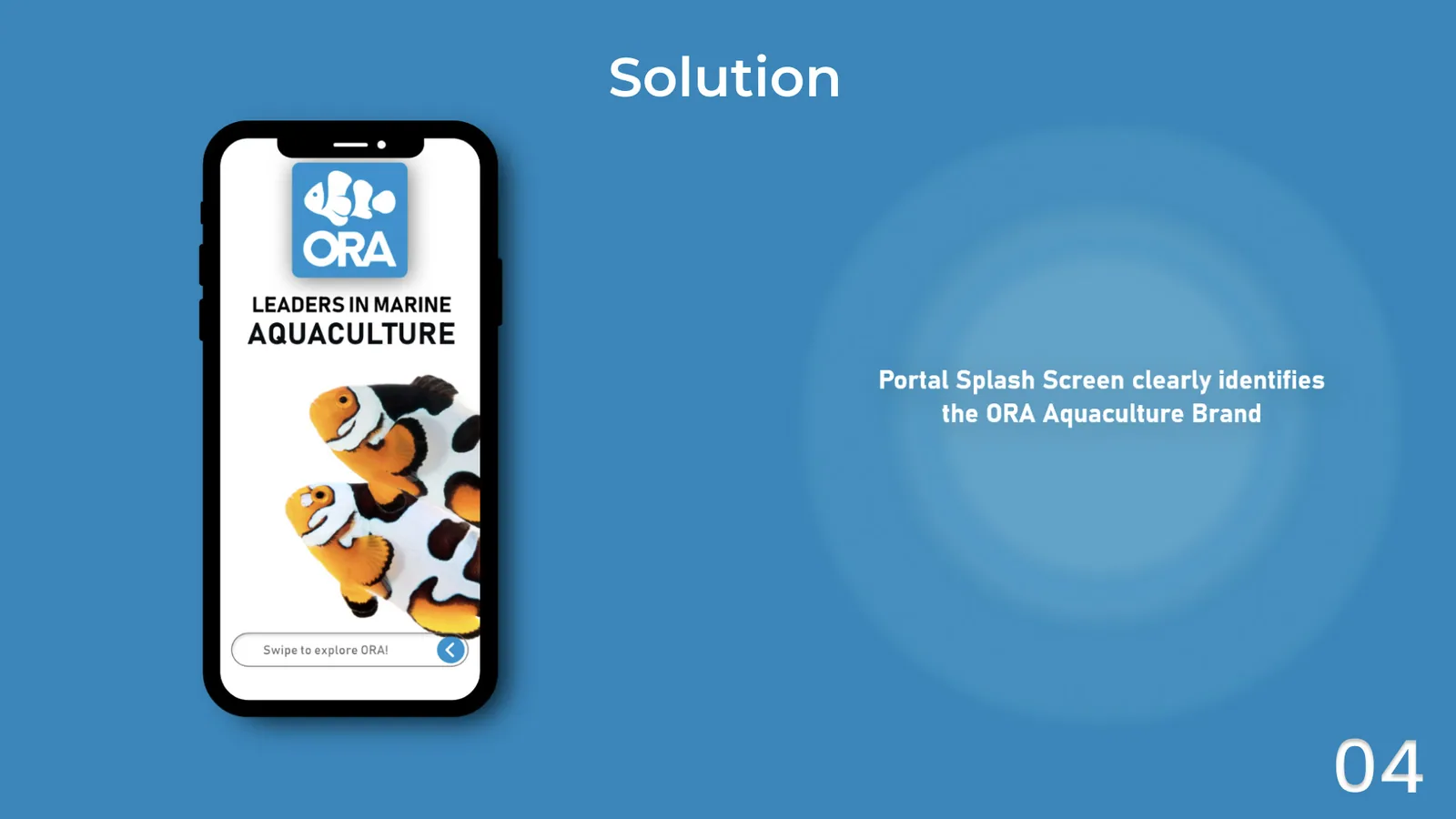
The portal splash screen, headed Leaders In Marine Aquaculture over ORA clownfish
Splash screen — clearly identifies the ORA aquaculture brand
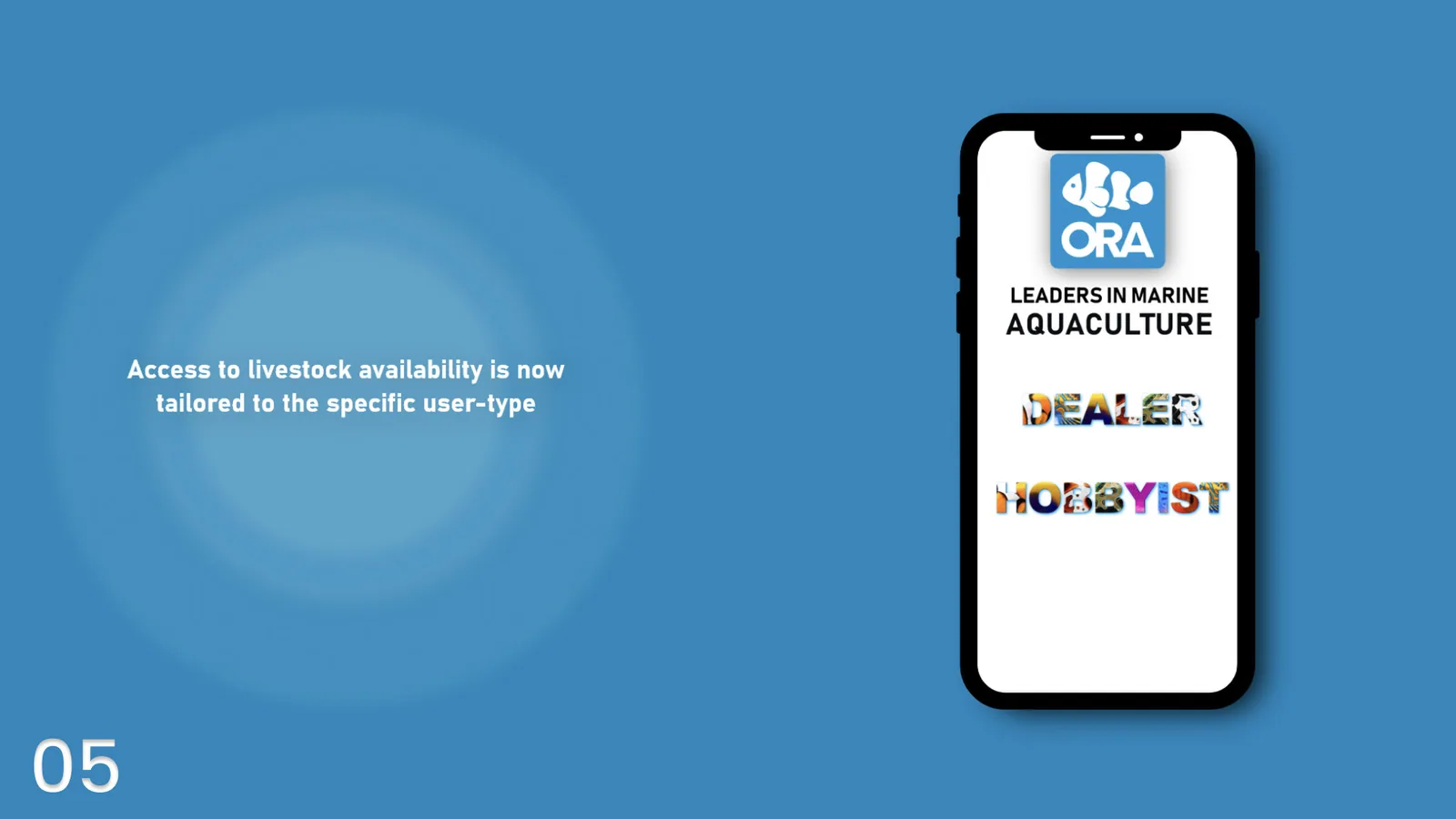
The user-type screen offering Dealer or Hobbyist, each set in photographic livestock lettering
Access to livestock availability is tailored to the specific user type
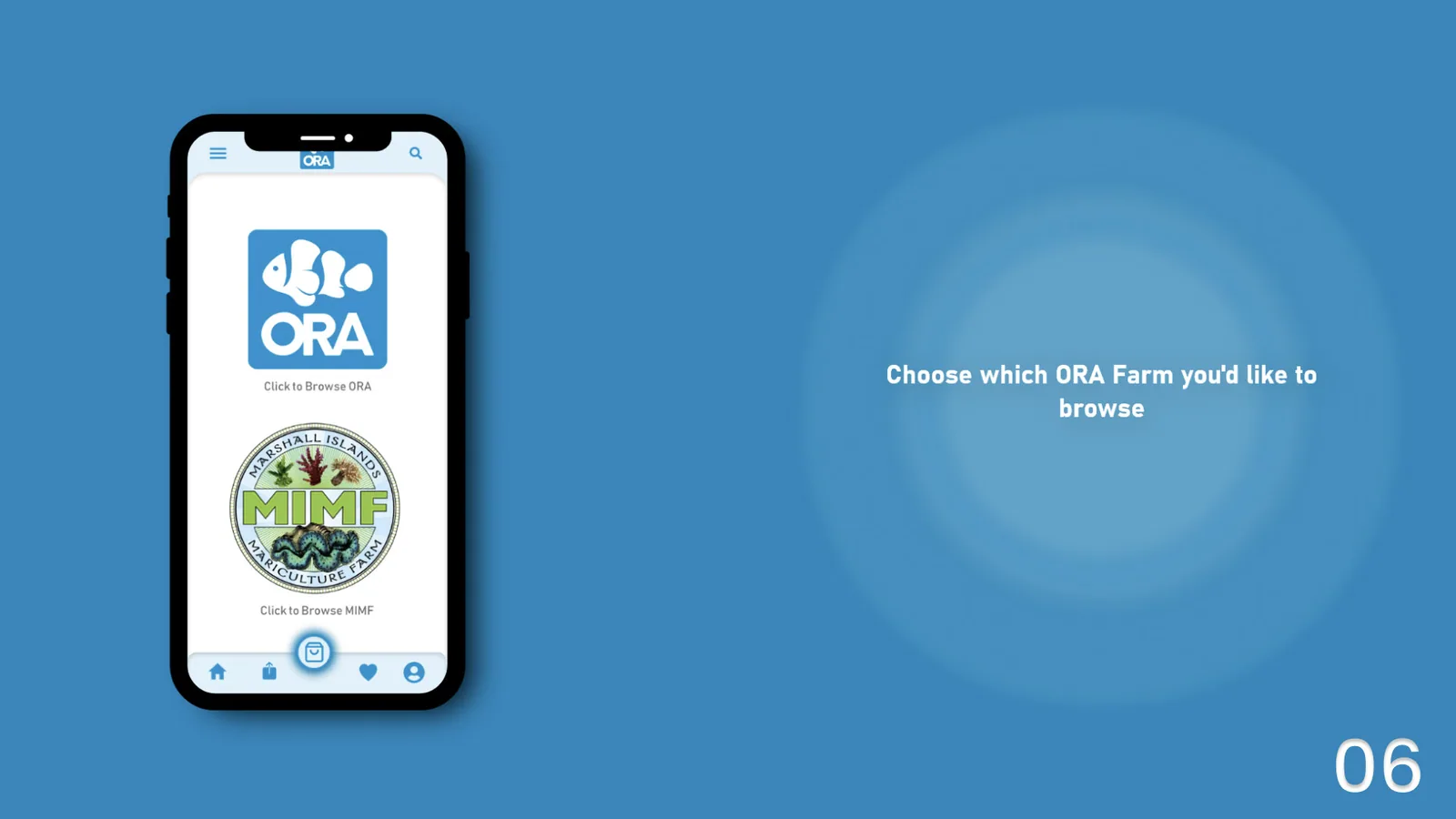
The farm picker, offering ORA or the Marshall Islands Mariculture Farm
Choose which ORA farm you’d like to browse
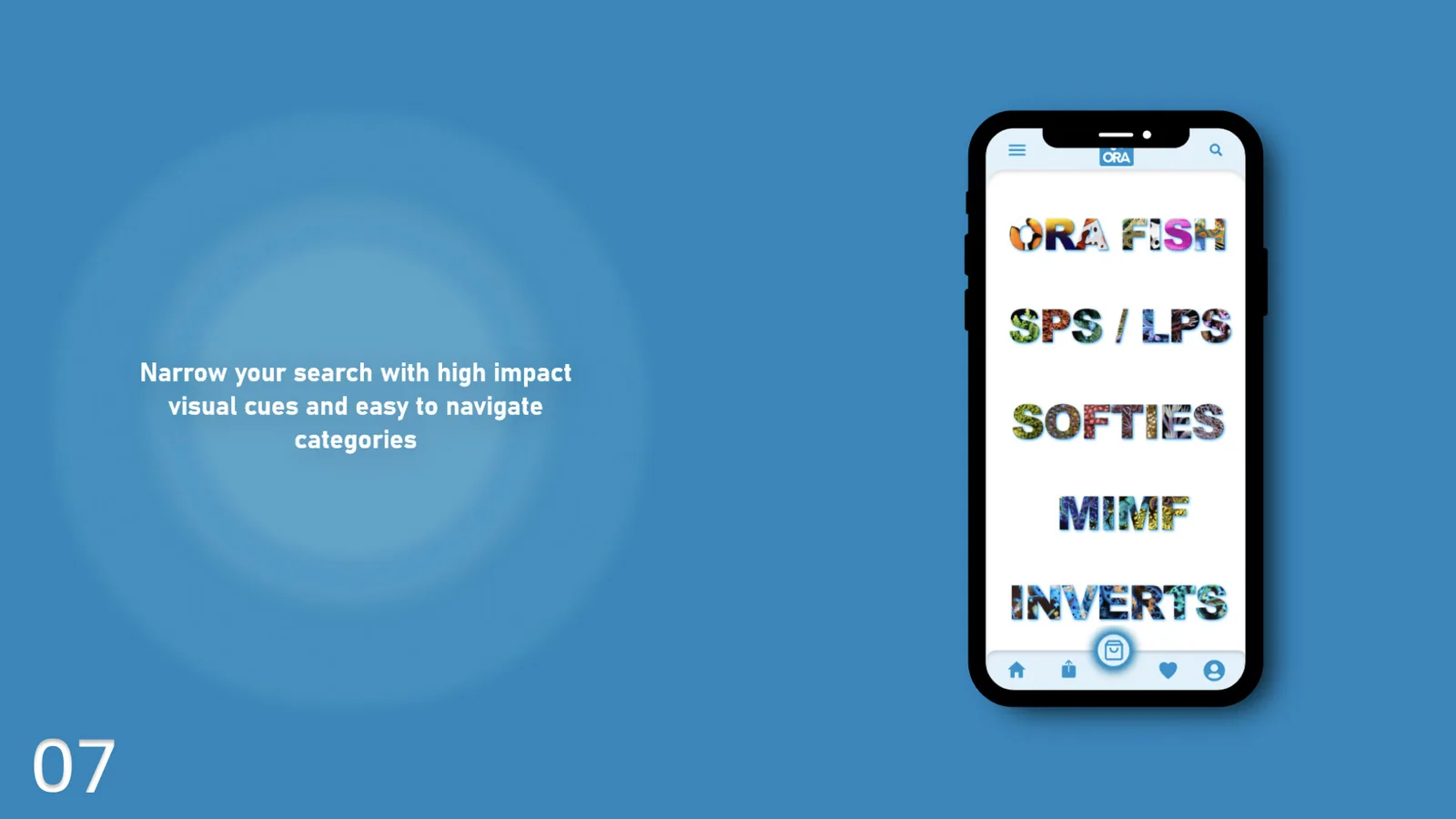
The category screen listing ORA Fish, SPS / LPS, Softies, MIMF and Inverts
Narrow your search with high-impact visual cues and easy to navigate categories
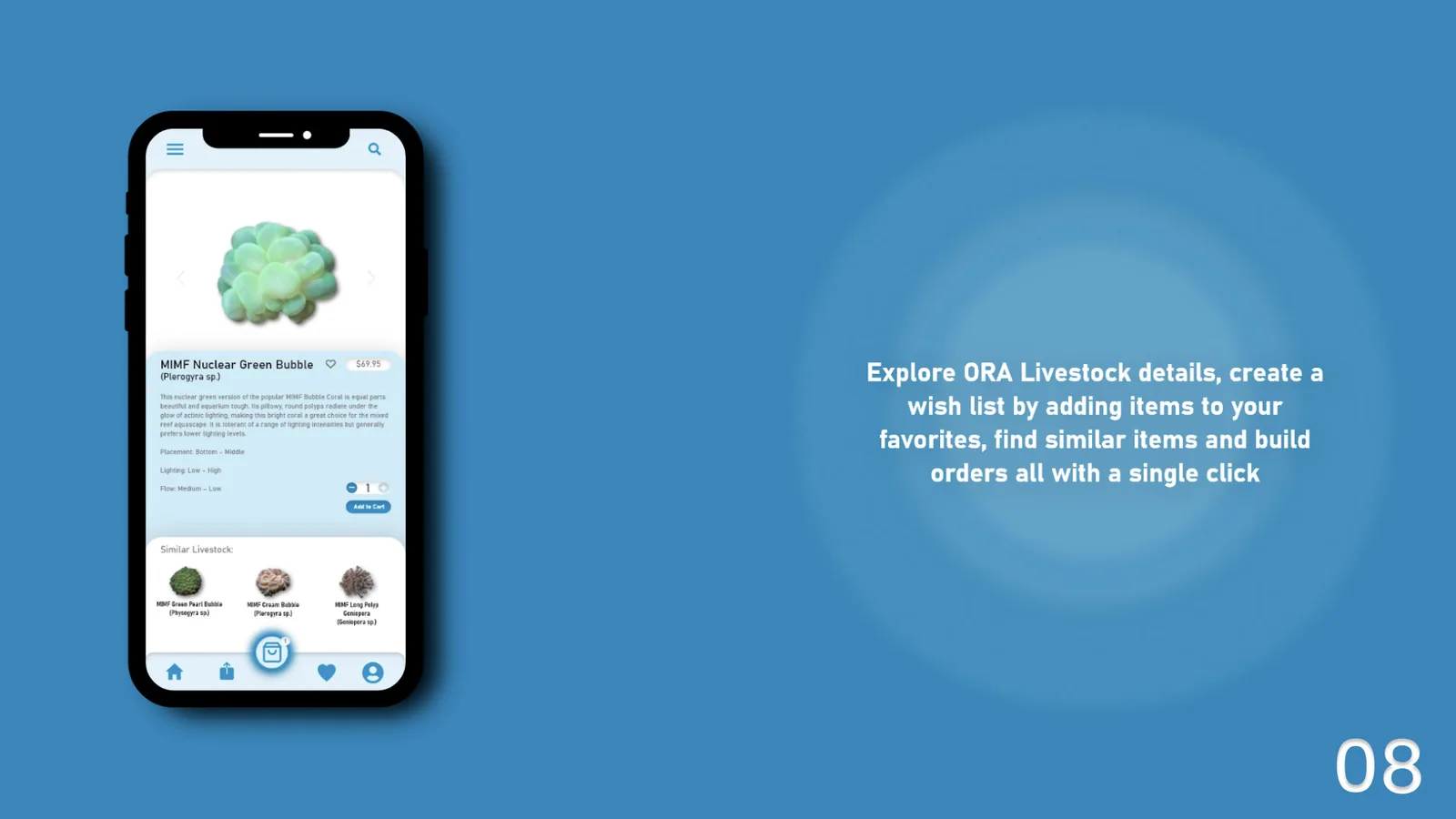
A product detail screen for MIMF Nuclear Green Bubble coral, with price, care notes and similar livestock
Explore livestock detail, build a wish list, find similar items and order in a single click

01 — Discover

A deep dive into the problems

  1. User interviews
  2. Business challenges
  3. User challenges
  4. User needs

User interviews — getting to know the user

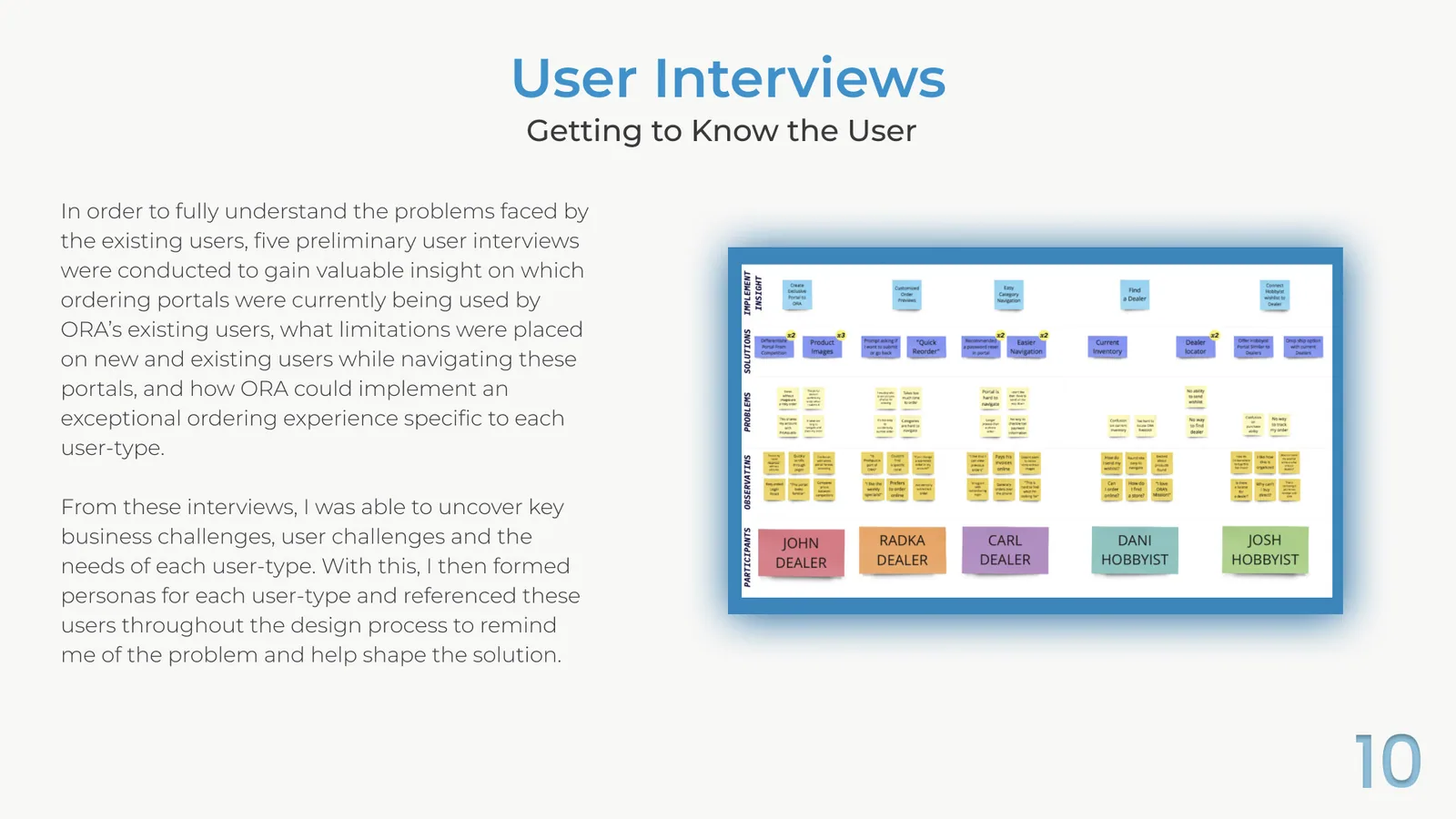
In order to fully understand the problems faced by existing users, five preliminary user interviews were conducted to gain insight into which ordering portals were currently being used by ORA’s existing users, what limitations were placed on new and existing users while navigating those portals, and how ORA could implement an exceptional ordering experience specific to each user type.

From these interviews I uncovered the key business challenges, the user challenges and the needs of each user type. I then formed personas for each user type and referenced them throughout the design process, to keep the problem in view and help shape the solution.

Participants — John, Radka and Carl (dealers) · Dani and Josh (hobbyists)

An affinity map from five user interviews, with participants across the bottom and rows for observations, problems, solutions and implementation insight
Affinity map from five user interviews

Key takeaways

Business challenges

  • Current infrastructure is not built to support multiple user types
  • Business model supports B2B sales and limits B2C sales
  • Current ordering portal is shared with a competitor platform, leading to order confusion
  • Lack of product images hinders sales, as customers cannot identify the product they need

User challenges

  • Hobbyists are unable to locate livestock in their area
  • Hobbyists and dealers view different product catalogs, causing confusion over what is available
  • Lack of product images hinders sales, as customers cannot identify the product they need
  • Difficult to distinguish between competitor ordering portals

User needs

  • An exclusively branded ordering experience, to avoid confusion between ORA and competitors
  • The ability to locate ORA livestock and place orders
  • Portal access tailored to user type
  • A visually immersive shopping experience

02 — Define

Who am I designing for?

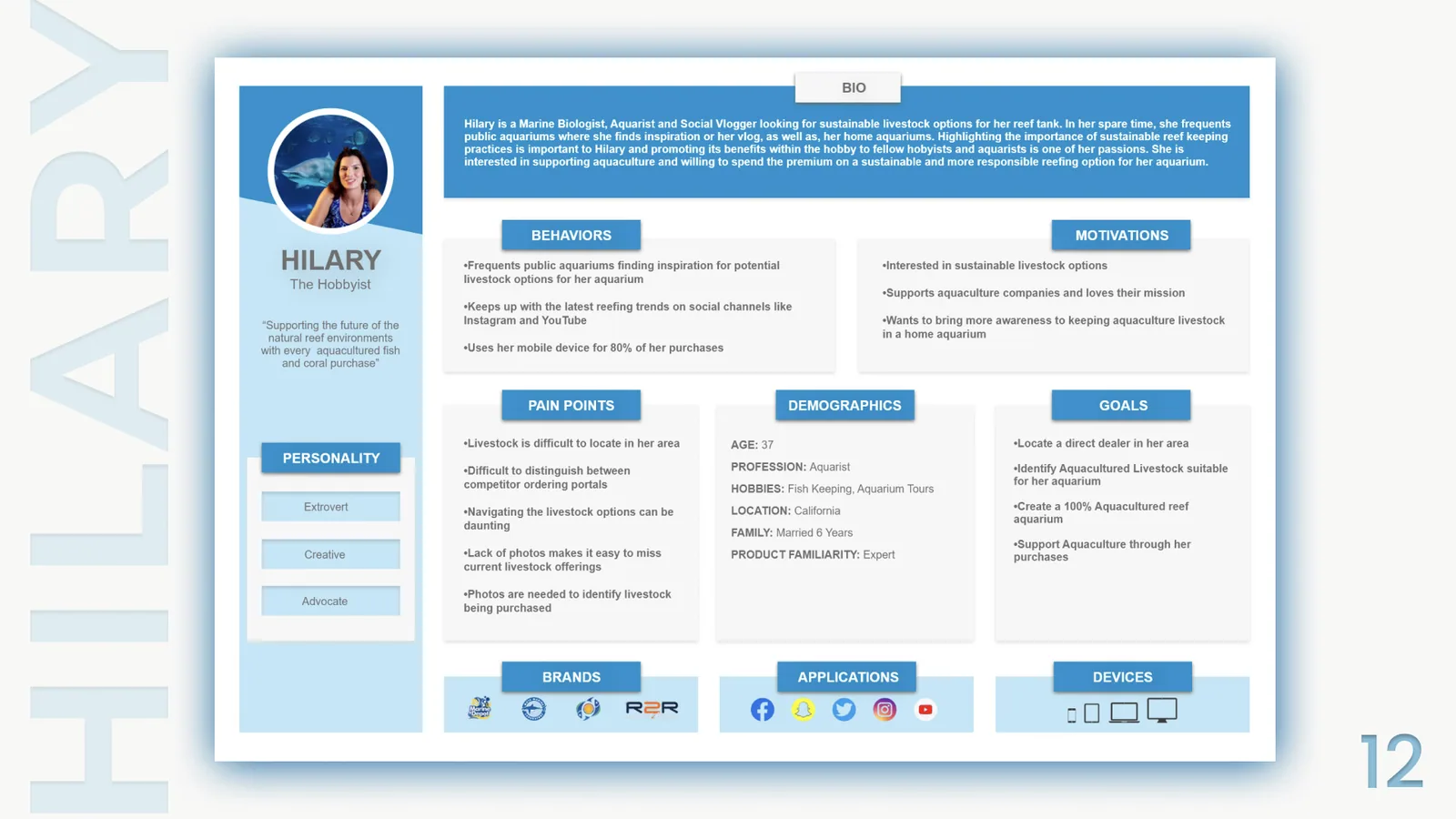
Based on findings from the preliminary user interviews, two distinct user types were defined to represent the key demographic of ORA portal user, so that later design decisions would be made with these users in mind. Meet Hilary, our hobbyist, and Jordan, our dealer.

Persona board for Hilary, The Hobbyist, with bio, behaviors, motivations, pain points, demographics and goals

Hilary — The Hobbyist

“Supporting the future of the natural reef environments with every aquacultured fish and coral purchase”

Extrovert · Creative · Advocate

Hilary is a Marine Biologist, Aquarist and Social Vlogger looking for sustainable livestock options for her reef tank. In her spare time she frequents public aquariums where she finds inspiration for her vlog, as well as for home aquariums. Highlighting the importance of sustainable reef keeping practices is important to Hilary, and promoting its benefits within the hobby to fellow hobbyists and aquarists is one of her passions. She is interested in supporting aquaculture and willing to spend the premium on a sustainable and more responsible reefing option for her aquarium.

Age
37
Profession
Aquarist
Hobbies
Fish keeping, aquarium tours
Location
California
Family
Married 6 years
Product familiarity
Expert

Behaviors

  • Frequents public aquariums finding inspiration for potential livestock options for her aquarium
  • Keeps up with the latest reefing trends on social channels like Instagram and YouTube
  • Uses her mobile device for 80% of her purchases

Motivations

  • Interested in sustainable livestock options
  • Supports aquaculture companies and loves their mission
  • Wants to bring more awareness to keeping aquaculture livestock in a home aquarium

Pain points

  • Livestock is difficult to locate in her area
  • Difficult to distinguish between competitor ordering portals
  • Navigating the livestock options can be daunting
  • Lack of photos makes it easy to miss current livestock offerings
  • Photos are needed to identify livestock being purchased

Goals

  • Locate a direct dealer in her area
  • Identify aquacultured livestock suitable for her aquarium
  • Create a 100% aquacultured reef aquarium
  • Support aquaculture through her purchases
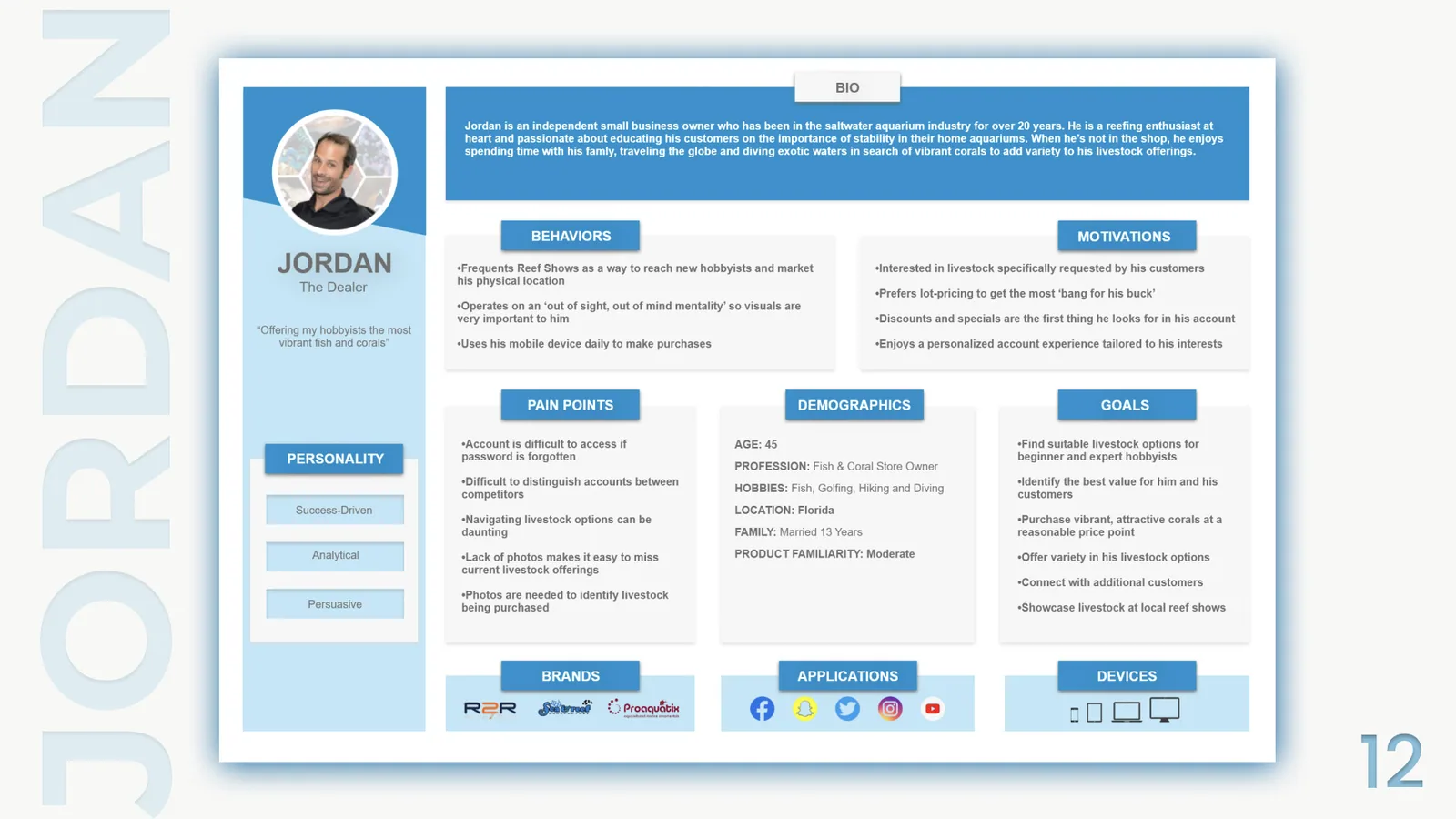
Persona board for Jordan, The Dealer, with bio, behaviors, motivations, pain points, demographics and goals

Jordan — The Dealer

“Offering my hobbyists the most vibrant fish and corals”

Success-Driven · Analytical · Persuasive

Jordan is an independent small business owner who has been in the saltwater aquarium industry for over 20 years. He is a reefing enthusiast at heart and passionate about educating his customers on the importance of stability in their home aquariums. When he's not in the shop, he enjoys spending time with his family, traveling the globe and diving exotic waters in search of vibrant corals to add variety to his livestock offerings.

Age
45
Profession
Fish & coral store owner
Hobbies
Fish keeping, golfing, hiking and diving
Location
Florida
Family
Married 13 years
Product familiarity
Moderate

Behaviors

  • Frequents reef shows as a way to reach new hobbyists and market his physical location
  • Operates on an 'out of sight, out of mind mentality' so visuals are very important to him
  • Uses his mobile device daily to make purchases

Motivations

  • Interested in livestock specifically requested by his customers
  • Prefers lot-pricing to get the most 'bang for his buck'
  • Discounts and specials are the first thing he looks for in his account
  • Enjoys a personalized account experience tailored to his interests

Pain points

  • Account is difficult to access if password is forgotten
  • Difficult to distinguish accounts between competitors
  • Navigating livestock options can be daunting
  • Lack of photos makes it easy to miss current livestock offerings
  • Photos are needed to identify livestock being purchased

Goals

  • Find suitable livestock options for beginner and expert hobbyists
  • Identify the best value for him and his customers
  • Purchase vibrant, attractive corals at a reasonable price point
  • Offer variety in his livestock options
  • Connect with additional customers
  • Showcase livestock at local reef shows

03 — Tasks

Getting into the flow

The Red Route Matrix was created to determine the importance of user tasks as it related to the user flow throughout the Ordering Portal. It gave significant insights into which of the screens of the Portal would need the most focus throughout the design process.

Red route matrix — task frequency against how many users perform it
Used by fewUsed by someUsed by manyUsed by everyone
Used alwaysLogin to portal
Used more frequentlyShare a wishlistCreate a wishlistProceed to checkout / Add product to cartBrowse livestock categories
Used less frequentlyAdd product to favoritesView previous orders
Used rarelySearch for livestockCreate order notesPassword reset

04 — Ideate

From frames to flows

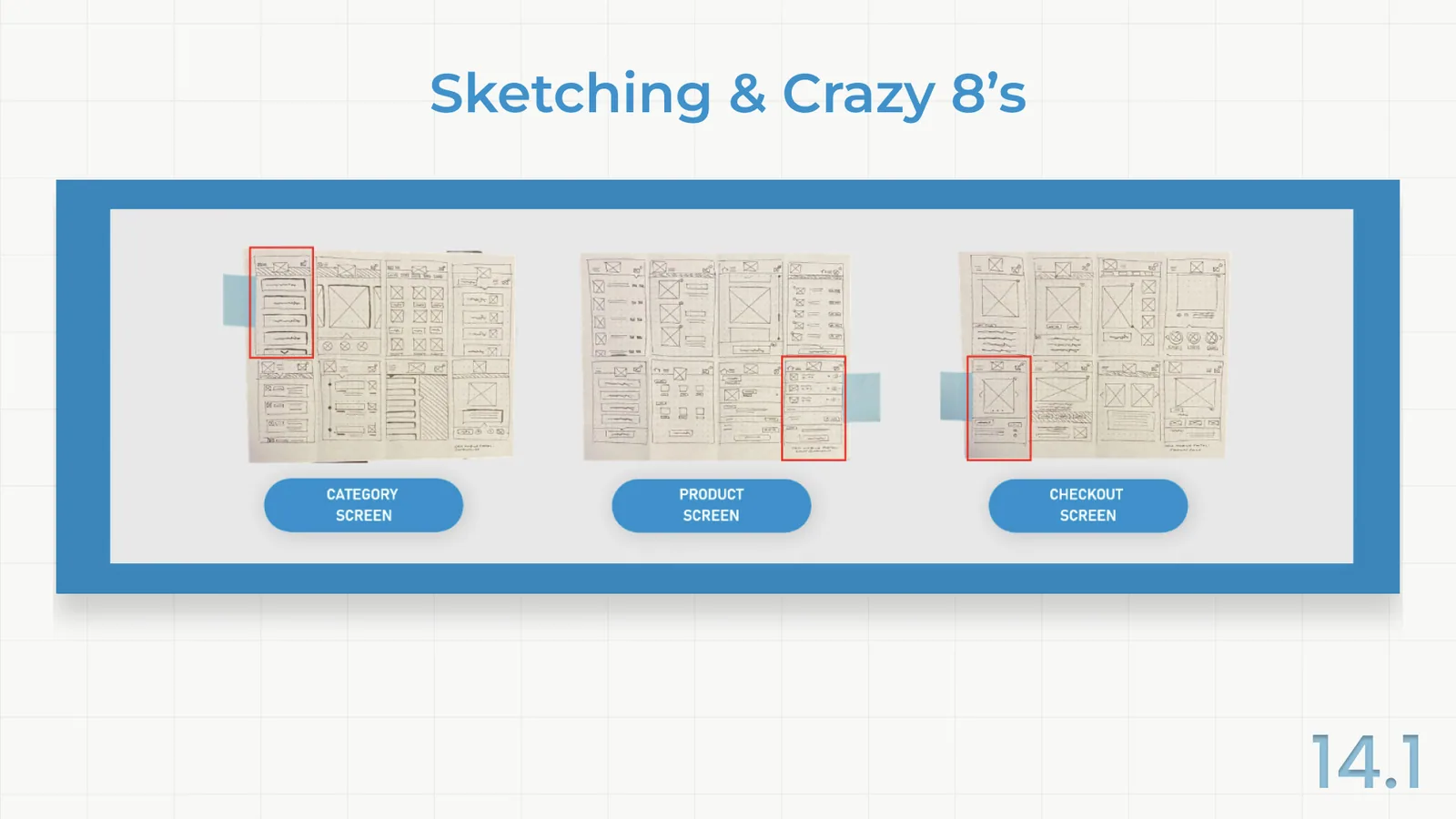
Beginning sketches focused on three improvement areas of the portal. In preliminary user interviews, these three screens were difficult to navigate and created confusion.

Crazy 8's and 3-part sketching offered insights into how these screens could be simplified for each user type.

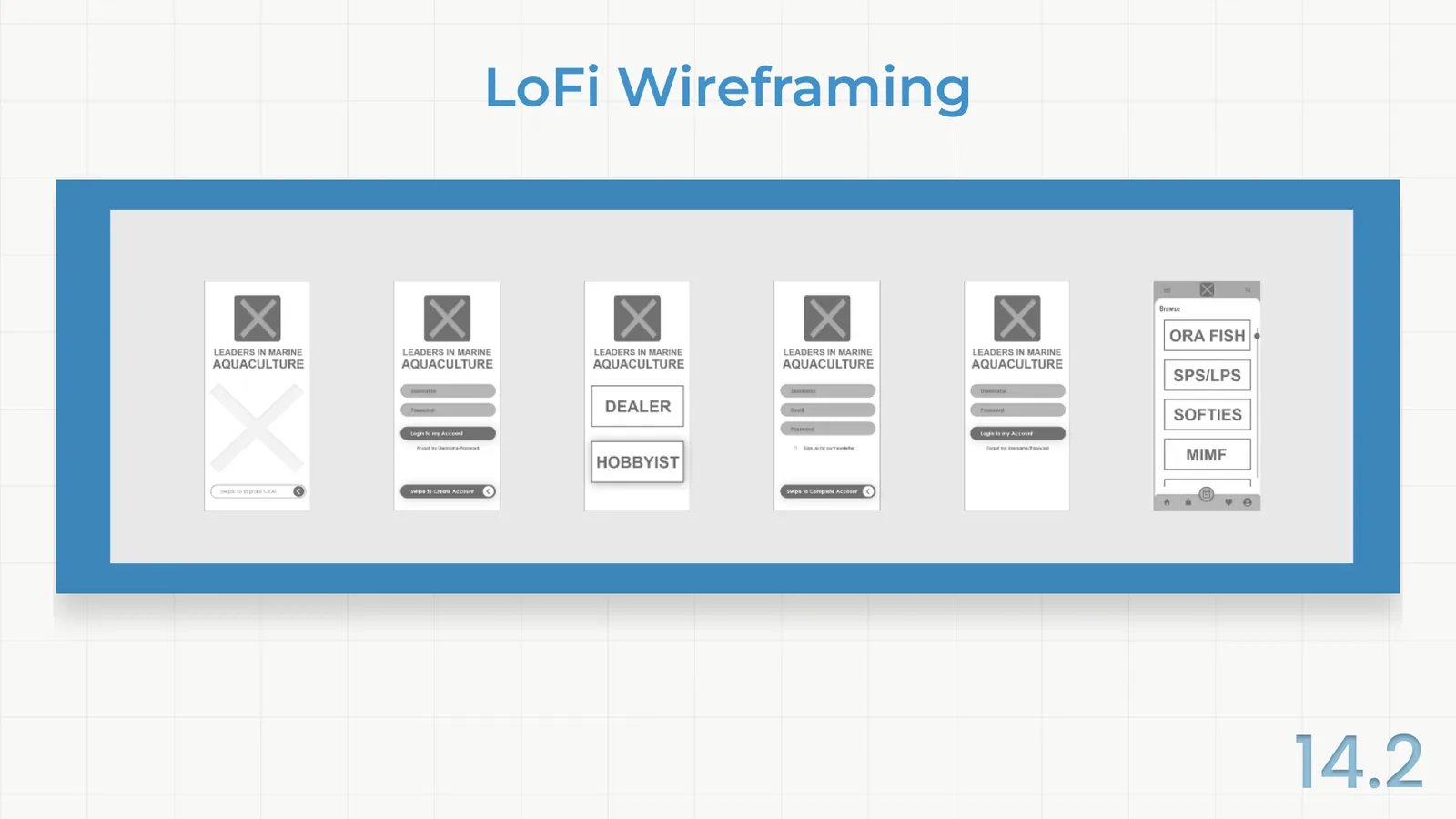
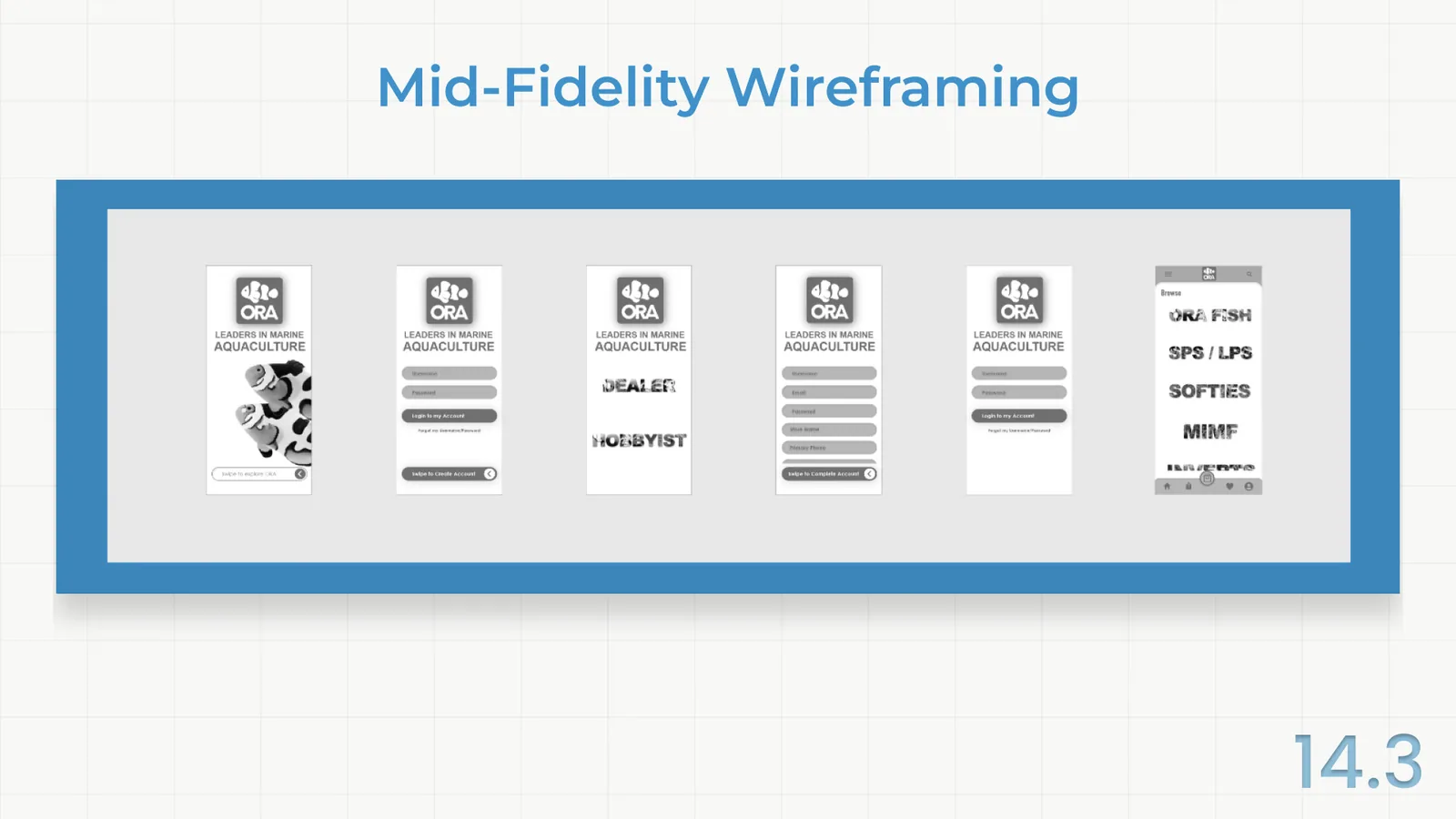
Low-fidelity and mid-fidelity wireframing were created, moving into the initial phase of user testing where 5 participants were asked to navigate through each screen and share aloud how they would approach navigating through the portal to complete specific tasks.

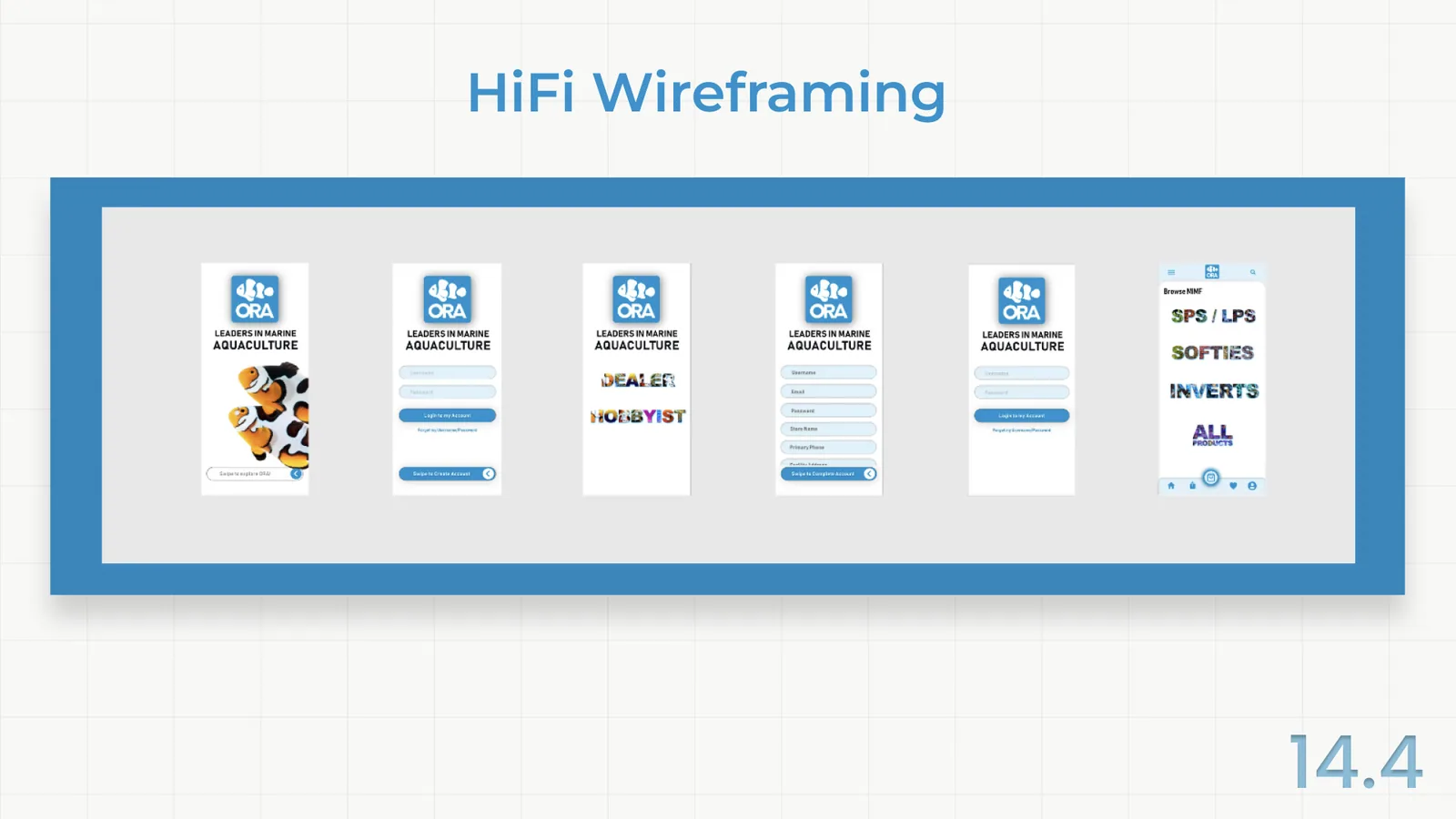
I later moved into creating high-fidelity mockups after user testing of the mid-fidelity wireframes was completed, with the goal of eliminating any pain points that had existed in iteration 1 testing.

Three sheets of Crazy 8's sketches, with the chosen frame ringed in red on each: category screen, product screen and checkout screen
Sketching and Crazy 8’s — category, product and checkout screens
Six low-fidelity wireframes: splash, sign-in, user-type choice, sign-up, password reset and category browse
Low-fidelity wireframes
The same six screens at mid fidelity, with ORA branding and type in place
Mid-fidelity wireframes
The six screens at high fidelity, in full ORA color with photographic category lettering
High-fidelity wireframes

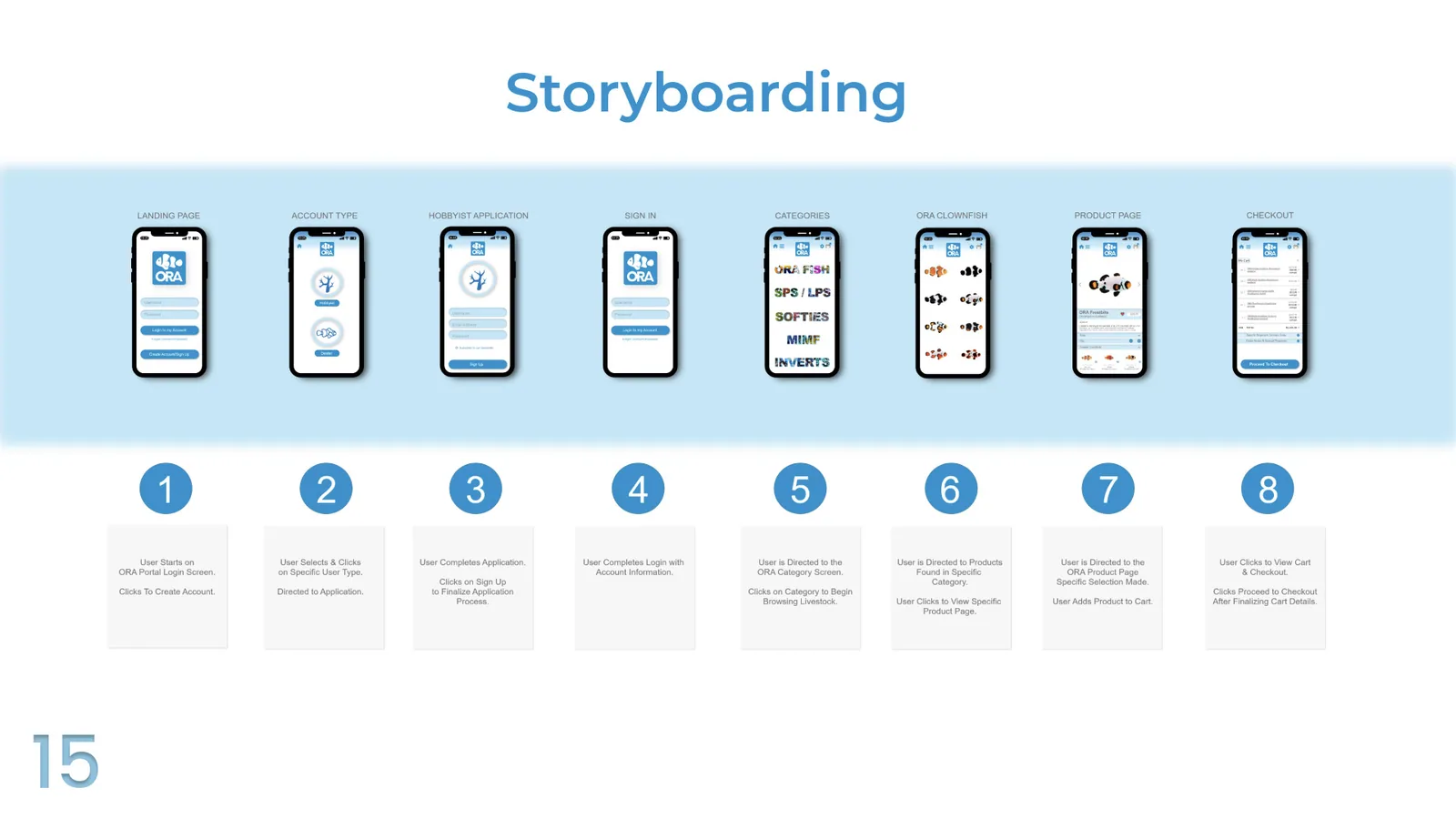
Storyboarding

  1. 1
    Landing page

    User starts on the ORA portal login screen, clicks to create account.

  2. 2
    Account type

    User selects and clicks on specific user type, directed to application.

  3. 3
    Hobbyist application

    User completes application, clicks on sign up to finalize the application process.

  4. 4
    Sign in

    User completes login with account information.

  5. 5
    Categories

    User is directed to the ORA category screen, clicks on category to begin browsing livestock.

  6. 6
    ORA clownfish

    User is directed to products found in specific category, clicks to view specific product page.

  7. 7
    Product page

    User is directed to the ORA product page, specific selection made, adds product to cart.

  8. 8
    Checkout

    User clicks to view cart and checkout, clicks proceed to checkout after finalizing cart details.

A storyboard of eight ORA portal screens, from landing page through account type, sign-in, categories, product page and checkout
The full ordering journey, landing page to checkout

05 — Test

Two iterations, tested by users

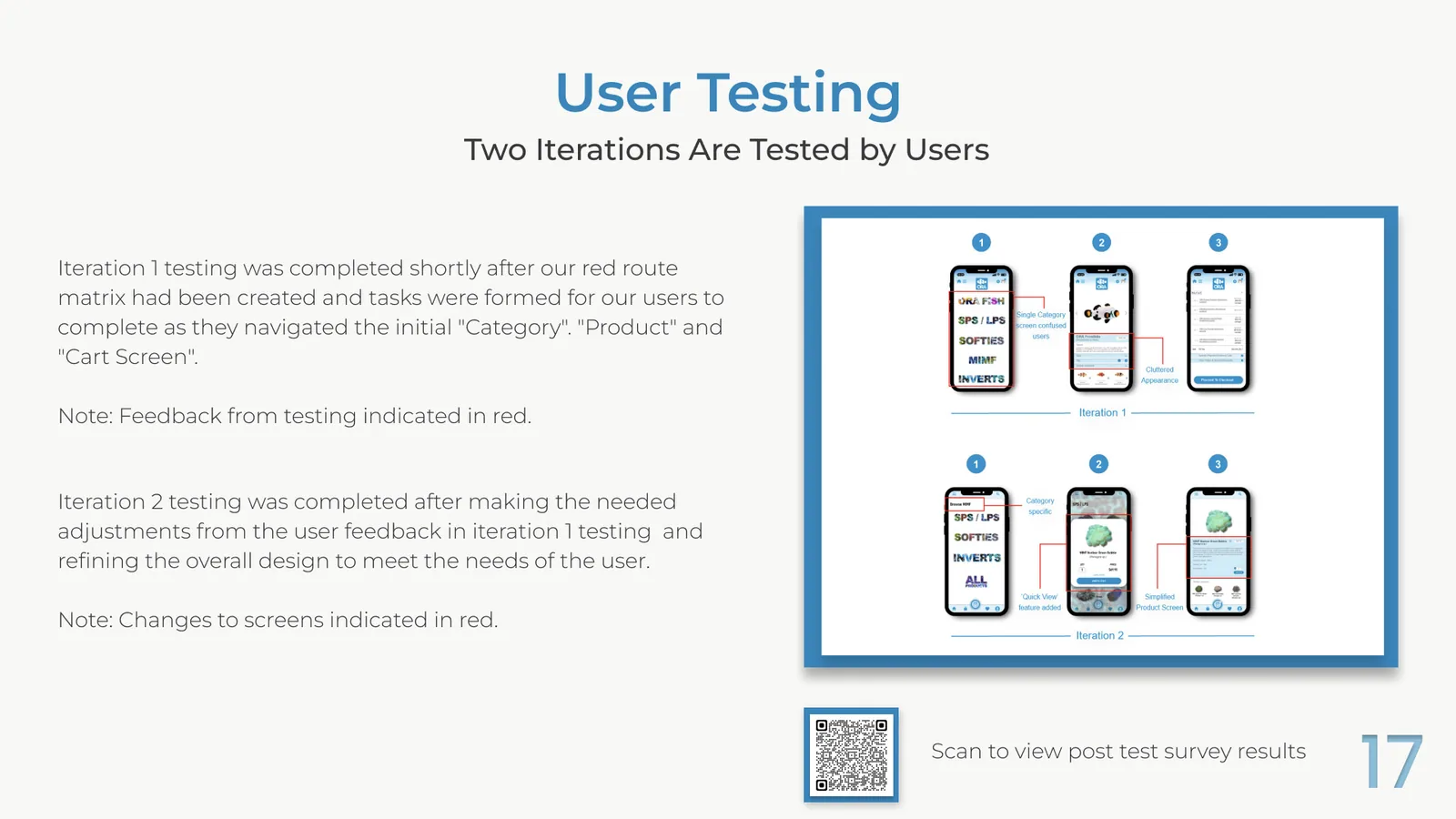
Iteration 1 testing was completed shortly after the red route matrix had been created and tasks were formed for our users to complete as they navigated the initial category, product and cart screens. Feedback from testing is indicated in red.

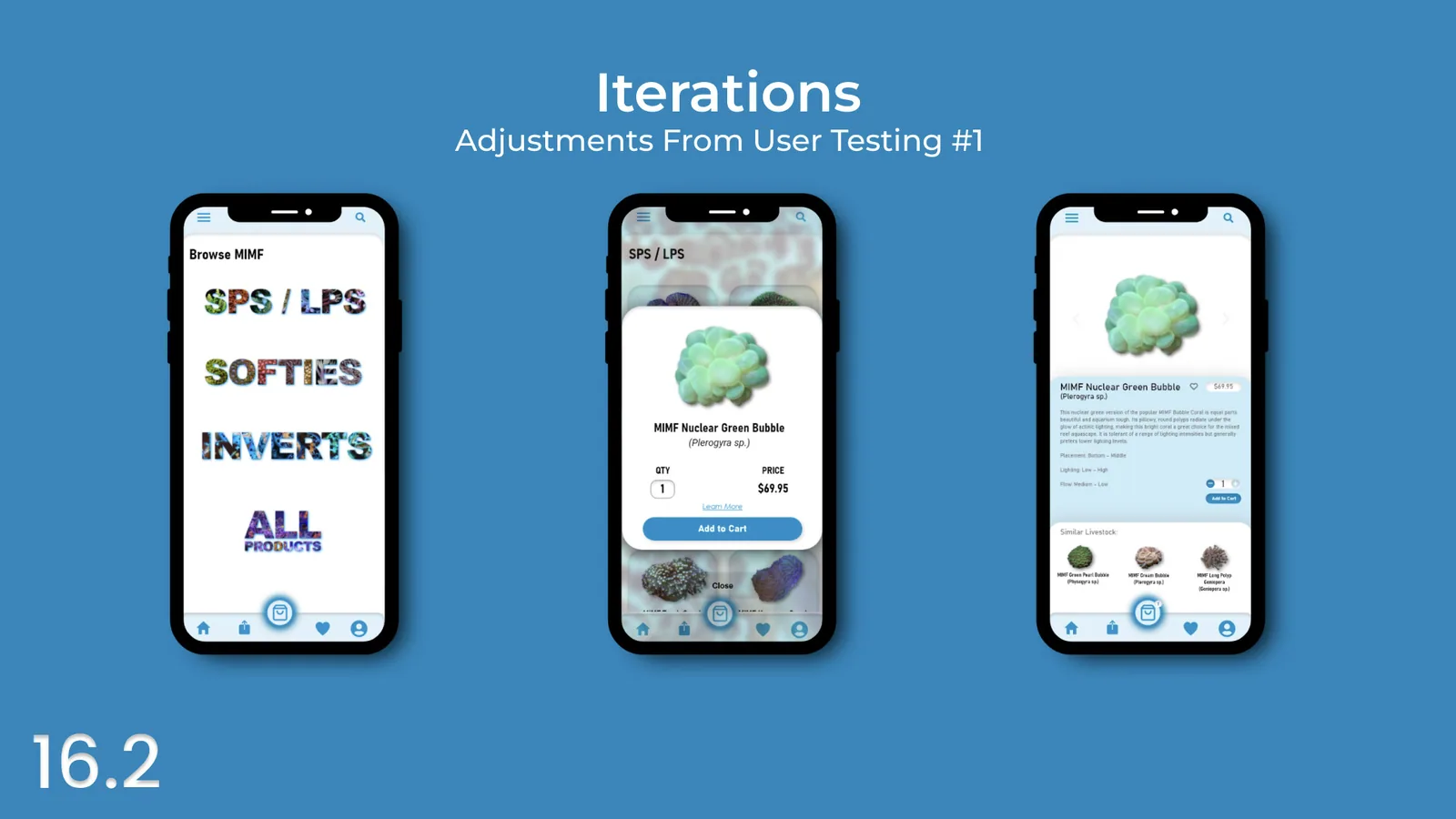
Iteration 2 testing was completed after making the needed adjustments from the user feedback in iteration 1 testing, and refining the overall design to meet the needs of the user. Changes to screens are indicated in red.

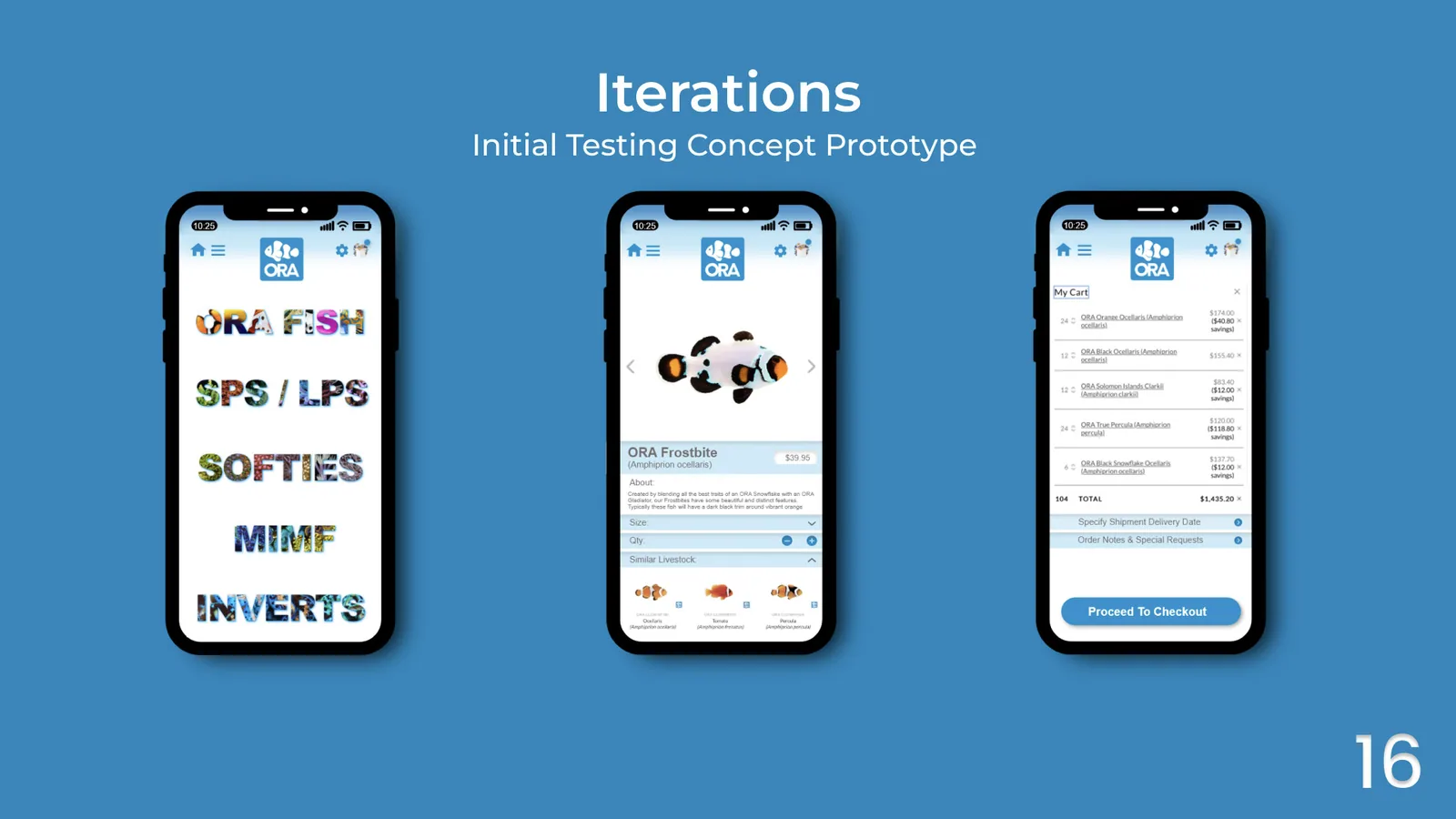
Three screens from the first concept prototype: category browse, product detail and cart
Iteration 1 — initial testing concept prototype
Three revised screens after the first round of testing, including the new Quick View product card
Iteration 2 — adjustments from user testing
Both test iterations side by side, with feedback and changes marked in red
Testing feedback, marked in red on both iterations

06 — Deliver

Time to grow with the flow

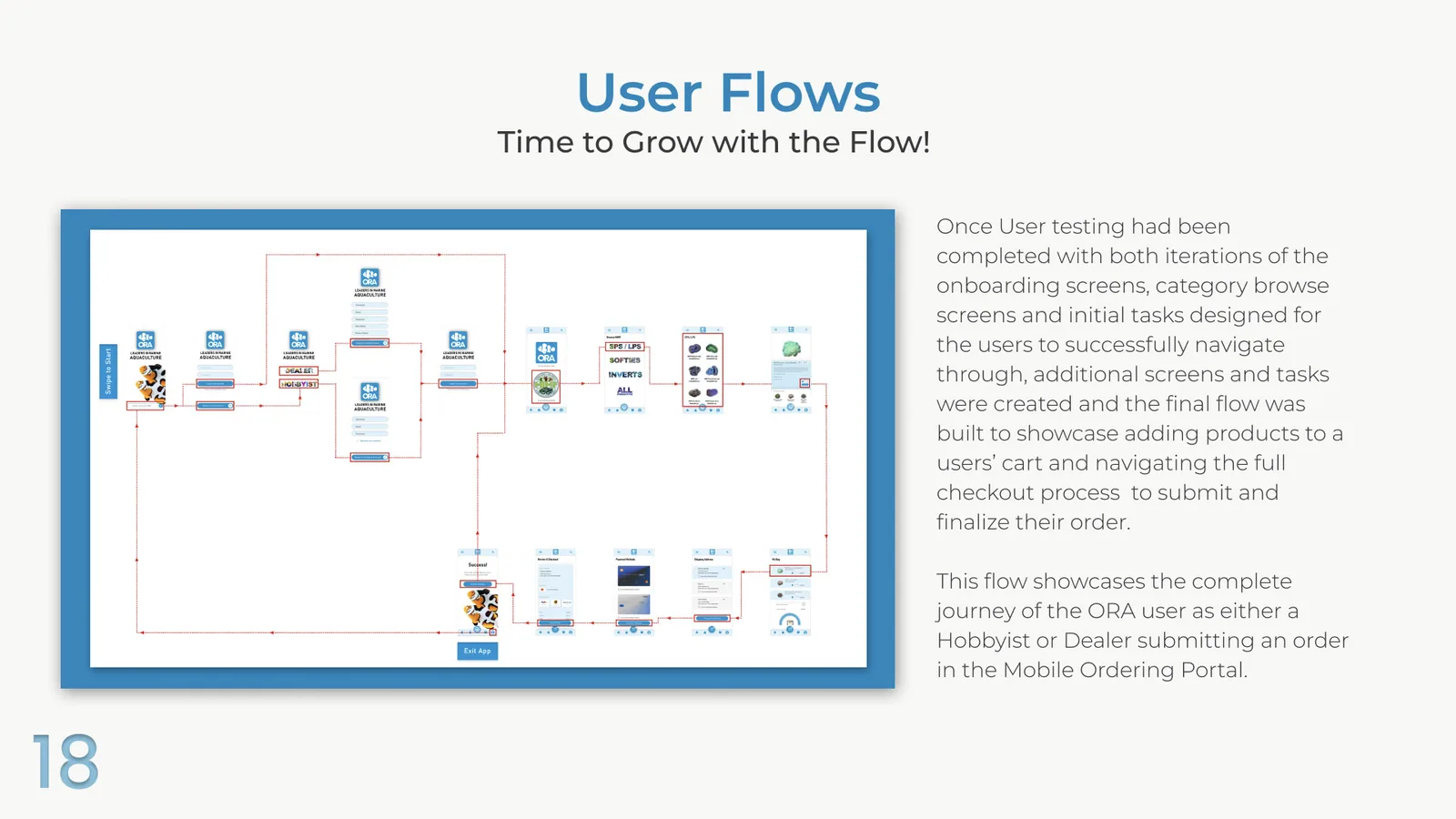
Once user testing had been completed with both iterations of the onboarding screens, category browse screens and initial tasks designed for the users to successfully navigate through, additional screens and tasks were created and the final flow was built to showcase adding products to a user's cart and navigating the full checkout process to submit and finalize their order.

This flow showcases the complete journey of the ORA user as either a Hobbyist or Dealer submitting an order in the Mobile Ordering Portal.

The complete ORA portal user flow, from onboarding through category browse, product selection, cart and checkout
The complete journey — hobbyist or dealer, onboarding to submitted order
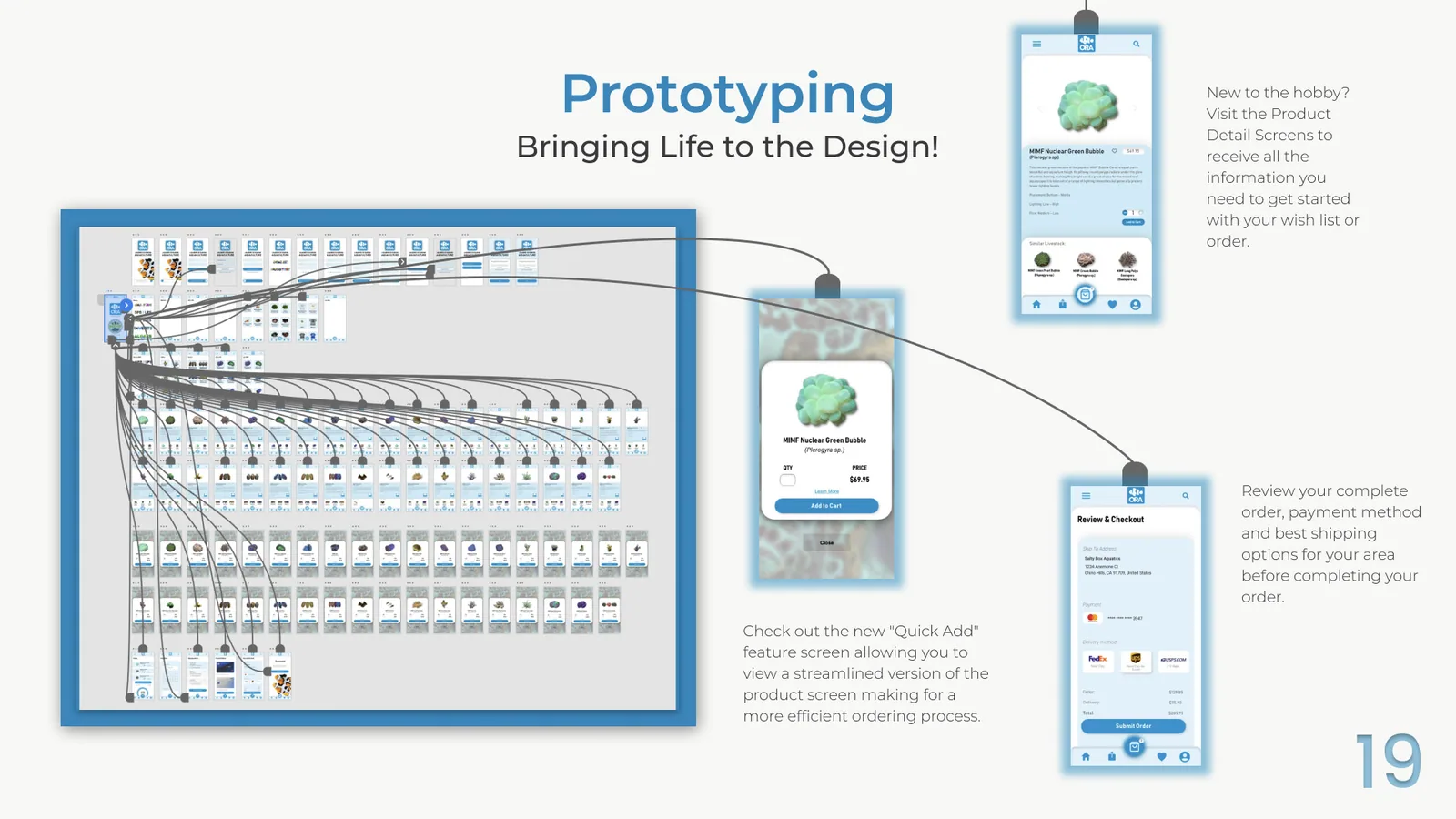
The prototype wiring in Figma, with hundreds of linked screens fanning out from the splash screen
Prototype wiring — every screen linked

New to the hobby? Visit the product detail screens to receive all the information you need to get started with your wish list or order.

Check out the new Quick Add feature screen, allowing you to view a streamlined version of the product screen making for a more efficient ordering process.

Review your complete order, payment method and best shipping options for your area before completing your order.

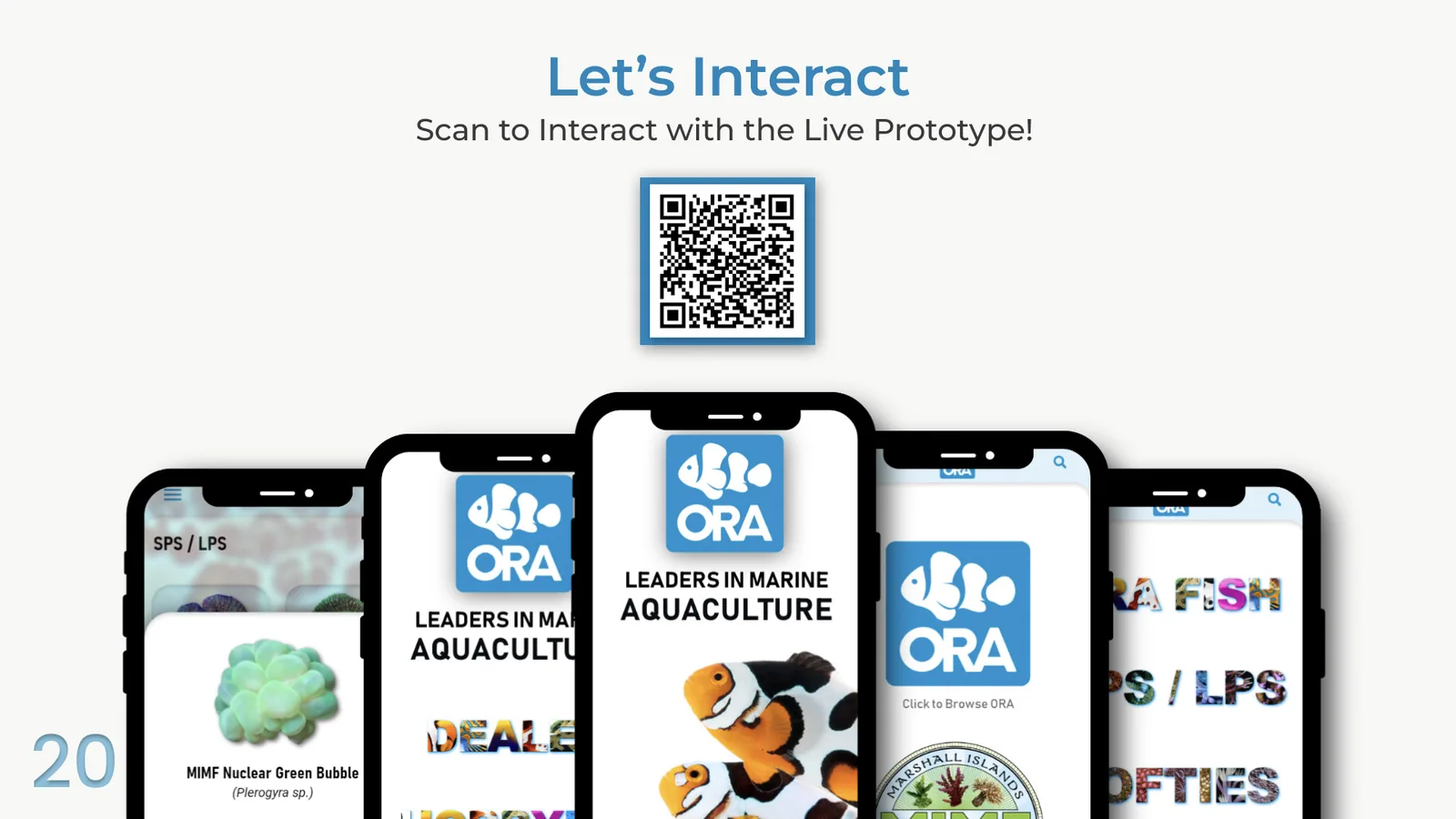
The finished prototype

Five ORA portal screens fanned out behind a QR code linking to the live prototype
Let’s interact — scan the plate to open the live prototype